
티스토리 뷰
Document: https://help.sonatype.com/repomanager2/configuration/security-setup-with-user-tokens
Security Setup with User Tokens
Resetting user tokens forces the users to update the settings.xml with the newly created tokens and potentially breaks any command line builds using the tokens until this change is carried out. This specifically also applies to continuous integration serve
help.sonatype.com
Rest API 를 이용하려고 Token 을 생성하려고 Token 값을 확인 하는데 찾기가 너무 어려웠습니다.
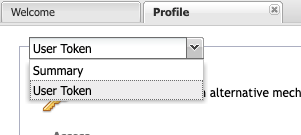
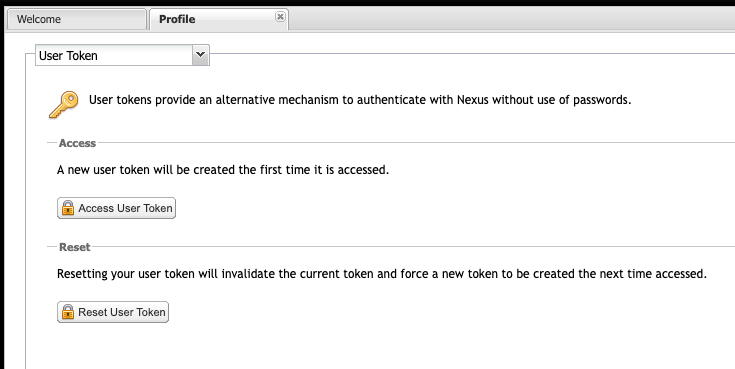
우측 상단에 아이디 클릭 후 Profile 로 간 다음, (여기서 중요) 위 'Summary' 라고 나와 있는 셀렉트 박스에서 User Token 이 숨겨져 있습니다. 이걸 선택하세요.
Nexus -> User ID (Located in the upper right corner) -> Profile ->
Select a 'User Token' in Combobox -> Click 'Access User Token'
'DevOps > Nexus' 카테고리의 다른 글
| Nexus: Group 사용 시 .pom 또는 metadata.xml 다운로드가 갑자기 느려질 경우 (0) | 2022.02.24 |
|---|---|
| Nexus: API List (0) | 2019.04.10 |
댓글
공지사항
최근에 올라온 글
최근에 달린 댓글
- Total
- Today
- Yesterday
TAG
- JVM
- ssl
- Thread Dump
- 플레이북
- Config History
- rundeck
- Nexus
- Shell Script
- 젠킨스
- openssl
- URL Encoding
- Linux
- 엔서블
- rsync
- 파이프라인
- groovy
- DevOps
- 데브옵스
- 쓰레드덤프
- 엔시블
- Jenkins
- nginx
- Playbook
- vagrant
- Ansible
- 리눅스
- Docker
- PostgreSQL
- Password manager
- iTerm2
| 일 | 월 | 화 | 수 | 목 | 금 | 토 |
|---|---|---|---|---|---|---|
| 1 | 2 | 3 | 4 | 5 | 6 | 7 |
| 8 | 9 | 10 | 11 | 12 | 13 | 14 |
| 15 | 16 | 17 | 18 | 19 | 20 | 21 |
| 22 | 23 | 24 | 25 | 26 | 27 | 28 |
글 보관함